
I Tried MacrosFirst After 15 Years on MyFitnessPal (Here’s What I’d Tell a New Tracker)

TL;DR: After 15 years on MyFitnessPal, I finally tried 2 weeks of MacrosFirst Premium. It’s faster, more customizable, and (in my opinion) way easier to navigate — especially if you’re newer to tracking. I have one small gripe, but I’m still switching.
Why I finally Tried MacrosFirst
Every time a new client asks me my thoughts on what the best macro tracking app is, without fail, I confidently answer, “MacrosFirst,” followed by some iteration of it being the app most of our KLN clients (and coaches!) find to be the easiest to navigate and encompassing of all of the best features from the tracking apps that came before it.
The “I don’t want to move my recipes” Excuse
I have a confession though: as a regular MyFitnessPal user since 2011, I have never actually used MacrosFirst personally…at least not until recently, when the idea for this blog post came to fruition. It was initially inspired by my desire to break away from my fixed mindset around struggling with technology-related change (“If I were just starting to track macros for the first time today, I would definitely be using MacrosFirst, but at this point I have 15 years worth of recipes I don’t want to have to save into another app!” I love to quip.) and be able to more confidently speak to MacrosFirst’s interface.
The real reason: MFP is too deep in diet culture
The deciding factor that ultimately pulled me off the fence was receiving an initial questionnaire from a highly active new client who detailed their sordid history of using MyFitnessPal, following a templated lower-than-low calorie recommendation that left them starving, tracking-obsessed, and believing that they were incapable of achieving the changes that they wanted to otherwise if they were doomed to these ill-fated tradeoffs as someone of shorter stature. It called to mind all of the other similar MFP stories I have heard from clients over my 8+ years of coaching, and while it and most other macro tracking apps allow for customization on the user’s end, most users new to tracking macros are not aware of that.
That gap in knowledge has time and time again led to macro tracking getting a bad rap at best and disordered eating tendencies at worst. MyFitnessPal is both the most well-known veteran and biggest culprit of signaling a false narrative of eating less equaling making more progress. The more I thought of personally continuing to financially support a platform that has harmed the very contingent that I dedicate my life aiming to help break free from that belief, the more heated I became in my resolve.
The bottom line after 2 weeks
In sum, I felt compelled to explore a new app environment, curious to experience firsthand the reportedly best macro tracking app on the market. The result after 2 free weeks of MacrosFirst Premium? I’ll be scheduling an afternoon in the near future to get all of my beloved recipes copied over to my new macro tracking home.
Disclosure: This post isn’t paid or sponsored—we wrote it out of genuine curiosity (and because we’re always trying to understand different tracking methods and tools so we can support clients better). And as always, tracking apps are personal: what feels “best” depends on your preferences, history, and what you want tracking to do for you. Every app has pros and cons.
That said, we do have a KLN promo code: use code KLN for 2 free weeks of MacrosFirst Premium. If you decide to sign up for Premium after your trial, we earn a small commission at no extra cost to you.
What I Loved Most about Macros First
Ease of Initial Setup
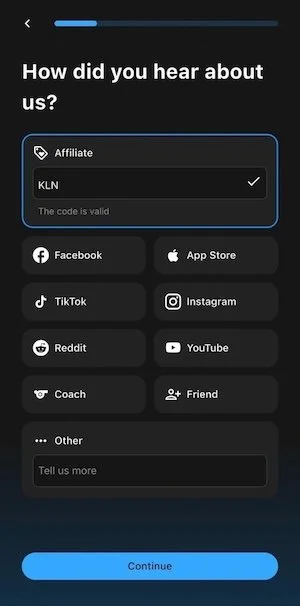
The steps to actually sign up for my free 2 weeks of MacrosFirst Premium couldn’t have been faster and simpler, and although I had some initial side-eye about entering in my height and weight—fully expecting to be given a set of macro targets based on that most basic information—I was quickly able to navigate to my settings to customize my macro targets.
Want to trial 2 free weeks of MacrosFirst Premium for yourself? Let us hook you up! Use the code KLN.
Customization Every Which Way
How many ways, you might ask?
You can customize your macro targets (as previously mentioned), but not only that, you can set up multiple sets of targets and assign them to specific days of the week. As someone who does best toggling between separate training day and rest day targets herself, this was a must-have feature that I was pleased to see MacrosFirst deliver on.
You can customize meal names and order of meals. If you wanted to label a meal category on a given day as “hit with hanger out of nowhere and tornado-ed through the kitchen,” you could (though don’t quote me on that in the event that there’s a character limit I haven’t discovered!) If you regularly devote macros to a post-workout snack but have inconsistent training times, you can shift that category accordingly.
You can customize your preferred serving units and pinned micronutrients. When I tell you that I gasped when I was alerted to this option on my first day of tracking in MacrosFirst, I truly mean it (just nerdy nutrition coach things?) Being able to have my preferred units of measurement of grams and milliliters pop up first as the tracking options for any entry I search and log makes the act of logging that much easier. Users are also able to choose which 4 micronutrients they want to show on the header of their logs so they can keep a closer eye on those snapshots.
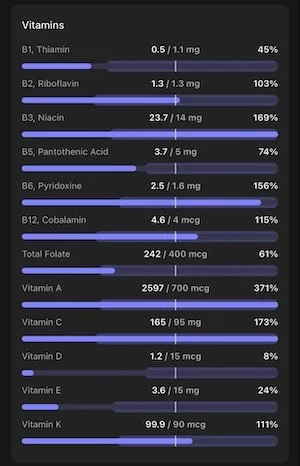
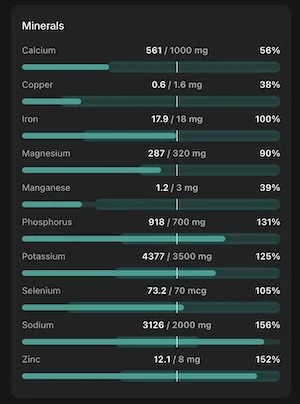
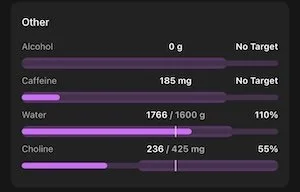
Detailed Micronutrient Tracking
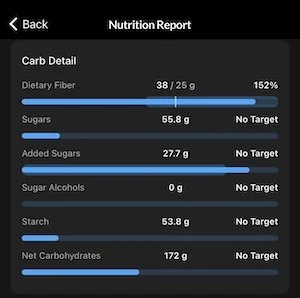
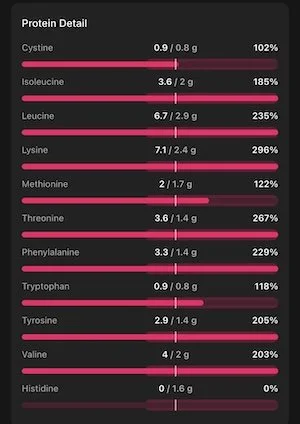
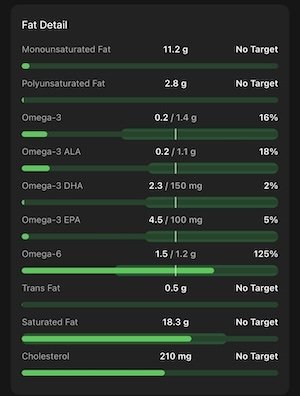
In other Just Nerdy Nutrition Coach Things, I ADORE a thorough micronutrient breakdown. This is a feature for which I regularly sing Cronometer’s praises to my clients who ask me my thoughts on that app, but I never knew that MacrosFirst also has it! After 15+ years of tracking my macros, I like to find new angles for goal-setting to keep my engagement high, and micronutrition is an area where I regularly seek that out. For users who might be deficient in certain micronutrients, this is an excellent resource for helping to fill those gaps from certain food choices.
Honorable Mentions
Sheer tracking speed. I am quick to counter clients’ comments about how time consuming tracking their macros is when I have literally timed myself to prove that that belief may be more of a mindset challenge than a scheduling one, but the ability to edit entries on your daily food log versus be taken to a separate screen for the entry in order to edit it (a feature of MFP’s I now understand is incredibly archaic and, dare I say, time consuming!) turns seconds into milliseconds.
Color coding that makes sense. Perhaps a personal pet peeve of mine, but I find both monotone categorization and unintuitive, pointless color coding to be grating visuals. MacrosFirst devotes a specific color to each macronutrient and calories, allowing the eye to immediately settle where you are wanting to look.
For our KLN Clients: Daily bodyweight entry syncing to your weekly check in! This means less data to enter on your check-in day!
What I Dislike(d) about MacrosFirst (and why it’s not a dealbreaker)
After consulting my notes from the last 2 weeks and wracking my brain for any complaints I may have overlooked, I have a grand total of one mentionable point.
Food Item History Being Less Predictive Than MyFitnessPal
Something that I really appreciated about MFP is that, when I went to log a food item for a meal, it would list below that entry other foods that I commonly ate alongside it. This allowed me to log a full meal in one fell swoop without having to have that meal saved as a commonly eaten one (“saved meals” is a feature that both MacrosFirst and MFP have, and no doubt it has utility, but I’ve admittedly not relied on it because I tend to mix and match meal components just enough to make it a less streamlined way of logging than it’s meant to be!). It’s the most minor of points to acknowledge, and I’ve already reasoned that I’m just going to have to turn my future afternoon of recipe-entering into my future afternoon of recipe-entering and commonly-eaten-core-meals-saving.
Who I Think MacrosFirst Is Best For
If you’re brand new to tracking, I really like MacrosFirst as a starting point because it makes it easier to set things up the way you actually need them (instead of accidentally treating a default calorie target like it’s the law).
If you’ve tracked for years but feel like logging still takes longer than it should, the speed and “editing in place” alone might win you over.
And if you’re a fellow nutrition nerd who likes to keep an eye on micronutrients sometimes (even just as a curiosity or a fresh angle for goal-setting), you may be pleasantly surprised by what’s built in.
If You’re New to Tracking: 3 things to consider
1. Customize your targets early
Even if an app gives you a starting point, it doesn’t mean it’s appropriate for your body, your training, your preferences, or your history. The app doesn’t know you and macro/calorie calculators historically recommend too-deep deficits and prescribe overly restrictive approaches.
2. Make it easier to log the way you actually eat
Rename meals, reorder them, pick your preferred units, pin the micronutrients you care about (or ignore them completely). The more the app matches your real life, the less likely tracking is to turn into a daily friction point.
3. Keep this in mind…
Macro tracking can be a helpful, temporary tool, but it’s not a requirement — and it’s not the right fit for everyone at every season. If tracking makes you more anxious, more rigid, or more obsessive, that matters more than what any app’s features can do. Tracking is just one tool of many, and there are other non-tracking strategies we can lean on to be more attentive to our nutrition without forcing tracking!
Final take: change is uncomfortable (and sometimes worth it)
My initial hesitations around moving away from the macro tracking app I’ve known for so many years were valid and mirrored a broader topic that we chat about with our KLN clients regularly: change is uncomfortable! Yet beyond the initial discomfort can lie bigger picture ease and satisfaction if we’re willing to be curious in our approach and believe in our abilities to adapt.
This post isn’t paid or sponsored—we wrote it out of genuine curiosity (and because we’re always trying to understand different tracking methods and tools so we can support clients better). And as always, tracking apps are personal: what feels “best” depends on your preferences, history, and what you want tracking to do for you. Every app has pros and cons.
That said, we do have a KLN promo code: If you want to give the Premium version of MacrosFirst a try, you can use the code “KLN” to get a 14 day free trial.
If you decide to sign up for Premium after your trial, we earn a small commission at no extra cost to you.
For absolute simplicity when it comes to tracking your macros, make sure to grab a free copy of Everyday Macros: our macro-friendly meal prep cookbook. It’s full of simple recipes, batch prep tips, and insight into how to make your nutrition as seamless as possible.

Jilda Lamb
Business owner, dog mom, and certified menopause coach, helping overwhelmed professionals and busy athletes simplify their nutrition and feel their best, both physically and mentally.
You might also like

Sign Up for the newsletterFollow KLN on social media
Transitioning away from tracking macros does not have to mean deleting your tracking app overnight and hoping for the best. This post walks you through how to practice eating without tracking in realistic, confidence-building steps so you can keep the skills tracking taught you without relying on an app.